requestbaby · 免费开源requestbaby · Free & open source
AI 交付的独立验收层,The independent acceptance layer辅助人对 AI 交付的成果验收。for what AI delivers.
不用逐行读代码,用证据决定收不收。Accept AI’s work on evidence, not on reading every line.
用 JSON 写下「发什么请求、点哪些按钮,应该得到什么结果」,requestbaby 真的去跑一遍,告诉你通过还是失败。接口(HTTP / gRPC / WebSocket)和界面(Web / Android)都能验收,界面的每一步都会截图留证。Write down what to send, what to click and what should happen, as JSON. requestbaby runs it for real and tells you pass or fail. It checks APIs (HTTP / gRPC / WebSocket) and UIs (Web / Android), with a screenshot on every UI step.
接口 + 界面APIs + UIs每步截图留证Screenshot on every step不调用大模型No LLM at judge timeCLI + macOS 桌面端CLI + macOS app
macOS 桌面端,以及 macOS / Linux 命令行,免费下载。macOS desktop app plus CLI for macOS and Linux, free to download. 查看下载See downloads。.
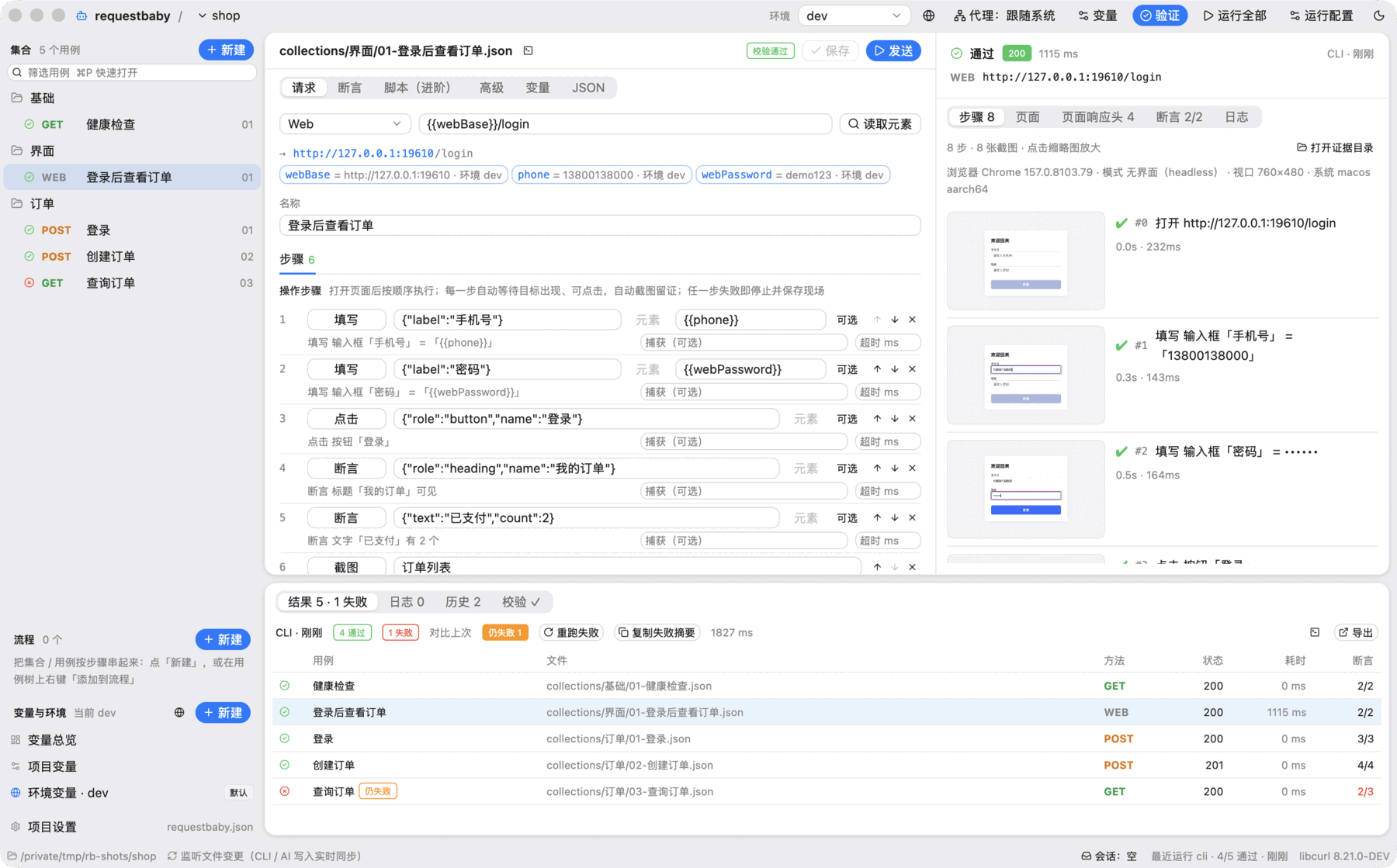
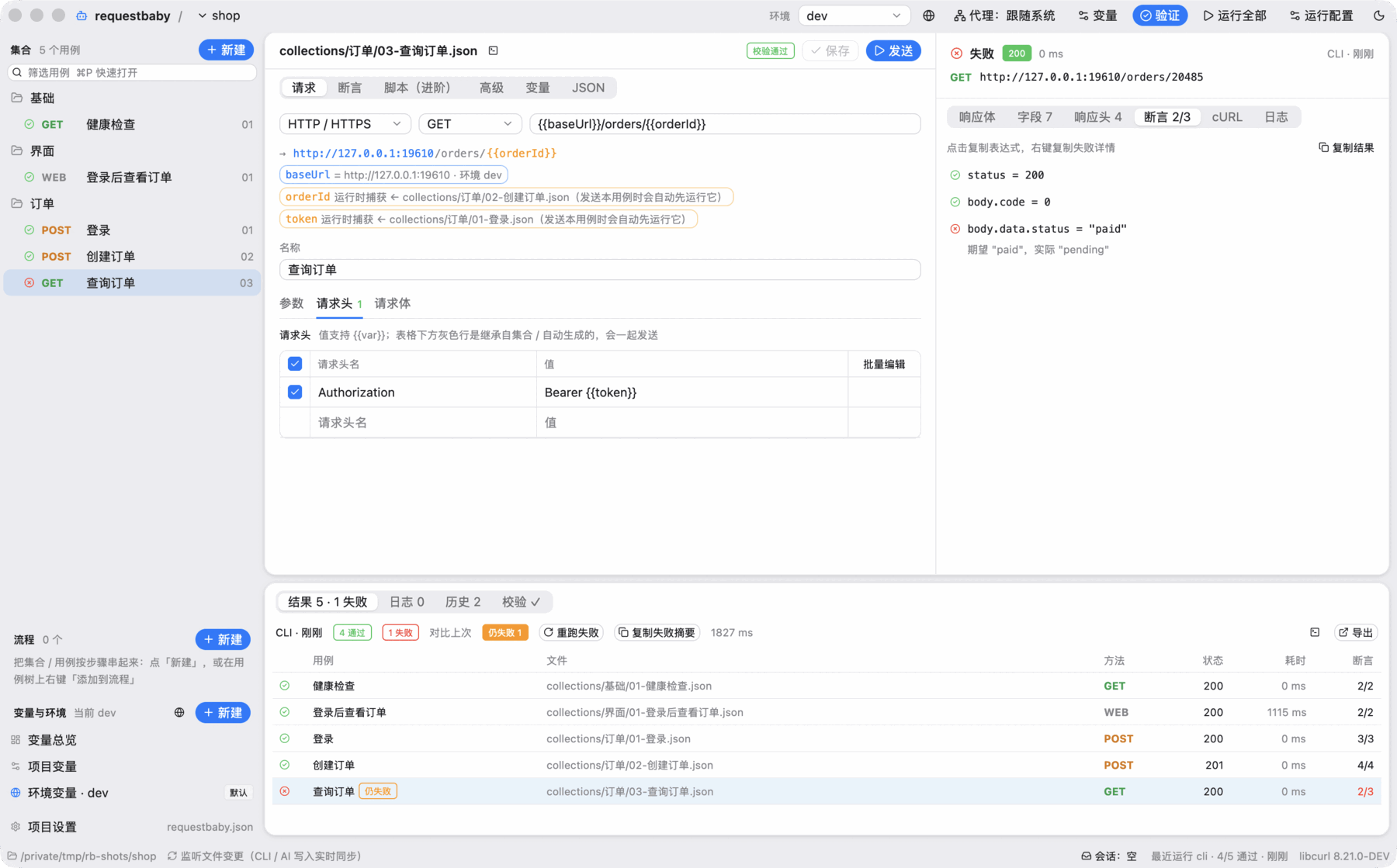
桌面端:左边是用例,中间编辑,右边是每一步的截图,下面是这次运行的结果。Desktop app: cases on the left, the editor in the middle, a screenshot of every step on the right and the run result below.
AI 写的代码,多到没人读得完。AI writes more code than anyone can read.
逐行审查已经跟不上 AI 的产出速度。信任需要换一种来源:一套独立于实现、由你自己握有的验收标准,加上可以重复运行的证据。requestbaby 做的就是这件事,让人在接受 AI 交付之前,有据可依。Line-by-line review can no longer keep up with what AI produces. Trust has to come from somewhere else: acceptance criteria you own, independent of the implementation, and evidence you can reproduce. That is what requestbaby provides, so a person can accept an AI delivery with something solid to point to.
独立于实现。Independent of the code.
用例是纯 JSON,从接口边界和界面外部去验,不依赖被测代码的内部结构。AI 可以读,也可以写,但断言是你定的,不会被悄悄放宽。Cases are plain JSON and check from the API boundary and the UI outside, not from inside the code. AI can read and write them, but the assertions are yours and cannot be quietly loosened.
接口和界面,一起验。APIs and UIs, together.
HTTP / HTTPS、gRPC、WebSocket 接口,Web 页面和 Android 应用,放在同一个项目里。断言状态码、响应头和响应体里的任意字段,登录得到的 token 存成变量供后面使用。HTTP / HTTPS, gRPC and WebSocket APIs, web pages and Android apps live in one project. Assert status, headers and any response field, and capture a login token as a variable for later steps.
每一步,都有证据。Evidence for every step.
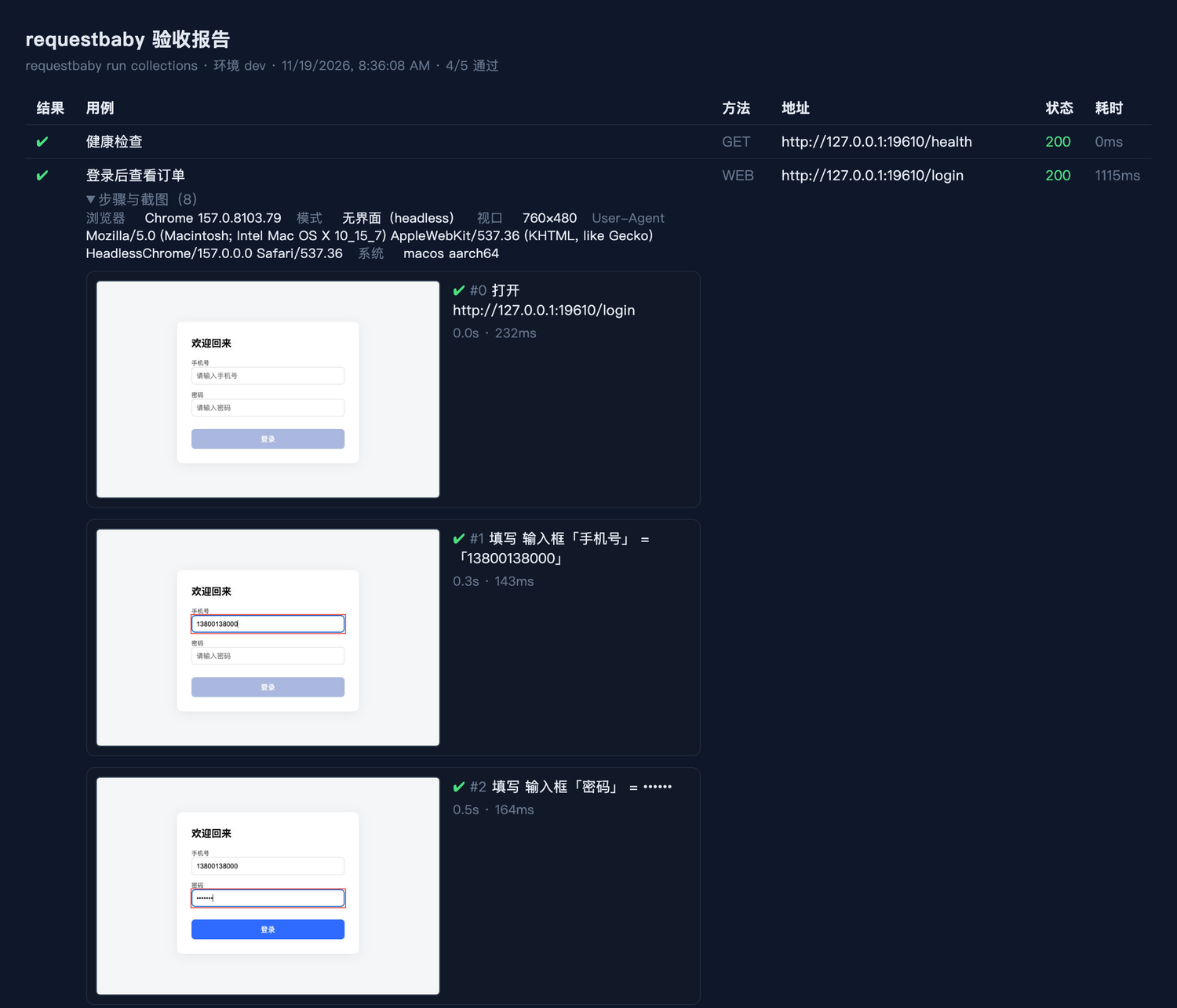
界面的每一步自动截图,框出点了哪里、验证了哪个元素;失败时另存页面、控制台和网络请求。运行历史记录对应的代码提交,同一提交上时过时不过的用例会标成“不稳定”。Every UI step is captured with the target boxed. On failure the page, console and network requests are saved too. History is tied to the commit, and cases that pass and fail on the same commit are flagged as flaky.
同样的用例,同样的结论。Same case, same verdict.
判断通过与否不调用大模型,不消耗 token。命令行退出码就是结论,一行命令放进 CI;单个可执行文件,运行时不依赖其他软件。No model is called to judge a result, so no tokens are spent. The CLI exit code is the verdict and one command fits into CI. It is a single executable with no runtime dependencies.
结论带着证据,一眼看懂差在哪。Every verdict comes with evidence.
接口用例失败时,直接告诉你断言了什么、期望什么、实际是什么;界面用例的每一步都有截图,红框标出点了哪里、验证了哪个元素。When an API case fails, you see what was asserted, what was expected and what actually came back. Every UI step has a screenshot with a red box around what was clicked or checked.
接口用例失败:期望 A failed API case: data.status 是 “paid”,实际是 “pending”。 expected “paid”, got “pending”.HTML 报告是单个文件,截图已嵌在里面,发给同事或贴到工单里直接能看。The HTML report is one file with screenshots embedded. Send it to a colleague or attach it to a ticket.
能验收什么。What it can check.
接口APIs
HTTP / HTTPS、gRPC(服务端反射或 .proto 文件,不用生成代码)、WebSocket(逐步发送、接收、断言)。dev / test / prod 各有一套地址和账号,密钥放在不入库的本机文件里。可以把多个集合串成流程,也可以按多组数据重复运行。HTTP / HTTPS, gRPC (server reflection or .proto files, no code generation) and WebSocket (send, receive and assert step by step). Separate addresses and accounts for dev / test / prod, with secrets kept in local files outside version control. Chain collections into flows or repeat a case over several data sets.
Web 界面Web UIs
直接驱动本机的 Chrome / Edge,不需要 Playwright 或 Node,也可以连 Docker、云端的远程浏览器。按人看到的样子找元素(名叫“登录”的按钮、标签是“手机号”的输入框),自动等元素就绪再操作,不用写 sleep。Drives your local Chrome or Edge directly, with no Playwright or Node, or connects to a remote browser in Docker or the cloud. Find elements the way a person sees them (the button named “Log in”, the input labelled “Phone”) and rely on auto-wait instead of sleeps.
Android 应用Android apps
通过 adb 操作真机或模拟器,远程模拟器、云手机也可以。同样按角色和文字定位,失败时保存界面结构和 logcat。Operate real devices or emulators through adb, including remote emulators and cloud phones. Locate by role and text as on the web, and keep the view hierarchy and logcat on failure.
现有资产What you already have
从 OpenAPI / Swagger / Postman / cURL 导入现成的接口。所有对外连接可以统一走代理(socks5 / http),也可以一键关掉。Import existing endpoints from OpenAPI / Swagger / Postman / cURL. Route all outbound traffic through one proxy (socks5 / http), or switch it off with a click.
先把它当成一个顺手的接口调试工具来用就够了,不需要先理解“验收”。You can start by using it as a handy API client. There is nothing about “acceptance” to learn first.
用表单构造请求:任意方法、查询参数、请求头,Body 支持 JSON、表单、form-data 文件上传和 raw 文本。Build requests with forms: any method, query parameters and headers, with JSON, form, form-data file upload and raw text bodies.
看清响应:状态码、耗时、响应体(格式化 / 原始)、响应头,还能看到等价的 cURL。Read the response: status, time, body (formatted / raw), headers, and the equivalent cURL.
环境与变量:dev / test / prod 各一套地址和账号;登录拿到的 token 存成变量,后面直接用;Cookie 自动保存。Environments and variables: one set of addresses and accounts for dev / test / prod, tokens captured from a login and reused, cookies saved automatically.
集合与批量运行:用例按目录分组,公共请求头只写一次,一键运行全部并看到每个用例的结果。Collections and bulk runs: group cases in folders, write shared headers once, run everything with one click and see every result.
从 cURL、Postman、OpenAPI / Swagger 导入现成的接口。Import existing endpoints from cURL, Postman and OpenAPI / Swagger.
从 Postman 过来?看Coming from Postman? See the concept map in the 快速上手quick start里的概念对照。.
放在 Cases live under collections/ 下,文件名顺序就是运行顺序。下面这个用例向 and run in file-name order. This one POSTs to baseUrl/auth/login 的 on /auth/loginbaseUrl 发一个 POST,期望状态码是 200、, expects status 200, code 等于 0、 equal to 0 and a string data.token 是字符串,并把 token 存起来,后面的用例写 , then stores the token so later cases can use {{token}} 就能用。失败时报告会直接写出:. On failure the report says exactly what differed: body.code = 0 → 期望 0,实际 4030001body.code = 0 → expected 0, got 4030001。.
界面用例的写法类似,把请求换成一步一步的操作。Android 把 UI cases look similar, with the request replaced by steps. For Android, swap web 换成 for android,写应用包名和步骤即可: and give the app package and steps:
开始很轻,三步到证据。Light to start. Three steps to evidence.
写下期望Write the expectations
自己写,或让 AI 读 Write them yourself, or have AI read the one-page requestbaby guide 那页写法速查后代写;也可以直接导入 cURL、OpenAPI、Postman。 and write them for you. cURL, OpenAPI and Postman can be imported too.
真的跑一遍Run it for real
requestbaby run 跑全部用例, runs every case; requestbaby verify 依次校验、跑用例、跑流程,给出一个结论。 validates, runs cases and flows, and returns one verdict.
看证据,做决定Read the evidence, decide
在桌面端或 HTML 报告里查看响应记录和每一步截图,再决定接受还是打回。Open the desktop app or the HTML report to see responses and per-step screenshots, then accept or send the work back.
requestbaby init myapi && cd myapi                          # 生成项目:dev / prod 环境、示例用例
requestbaby vars set baseUrl http://localhost:8080 -e dev   # 告诉它被测服务在哪
requestbaby send collections/orders/01-创建订单.json --suggest   # 发一次,看真实响应,并给出断言建议
requestbaby run                                             # 跑全部用例
requestbaby open                                            # 在桌面端打开这个项目requestbaby init myapi && cd myapi                          # scaffold a project: dev / prod envs, sample case
requestbaby vars set baseUrl http://localhost:8080 -e dev   # tell it where the service under test lives
requestbaby send collections/orders/01-create-order.json --suggest   # send once, see the real response, get assertion hints
requestbaby run                                             # run every case
requestbaby open                                            # open the project in the desktop app
命令行和桌面端读写同一个项目目录,桌面端里的每个操作都有对应的命令。The CLI and the desktop app read and write the same project directory, and every action in the app has a matching command.
适合谁用。Who it is for.
让 AI 写后端或前端,想自己握有一套验收标准、不用逐行读代码的人。People who let AI write backend or frontend code and want their own acceptance criteria instead of reading every line.
想把接口检查、界面检查放进 CI 的团队。Teams that want API and UI checks in CI.
需要给测试结果留证据的场合:请求响应记录、每一步的截图、可以直接转发的报告。Anyone who needs to show evidence: recorded requests and responses, per-step screenshots, and a report that can be forwarded as is.
AI 写的代码越来越多,没人能逐行读完。requestbaby 让你自己握有一套验收标准:把「发什么请求、点哪些按钮,应该得到什么结果」写成 JSON,让它真的跑一遍,用通过或失败、响应记录和每一步的截图来决定接不接受这次交付。AI now writes more code than anyone can read line by line. requestbaby lets you keep your own acceptance criteria: write what to send, what to click and what should come back as JSON, run it for real, and use the pass/fail result, recorded responses and per-step screenshots to decide whether to accept a delivery.
它和 Postman、Playwright 是什么关系?How is it different from Postman or Playwright?
它们是顺手的开发工具,requestbaby 站在验收这一侧:用例是纯 JSON,与被测代码相互独立,AI 也读得懂、写得出;接口和界面在同一个项目里验收,结论带证据。已有的 Postman、OpenAPI、cURL 可以直接导入。界面验收直接驱动本机的 Chrome / Edge,不需要安装 Playwright 或 Node。Those are development tools; requestbaby sits on the acceptance side. Cases are plain JSON, independent of the code under test, and easy for both people and AI to read and write. APIs and UIs are checked in one project, and every verdict comes with evidence. Postman, OpenAPI and cURL can be imported. UI checks drive your local Chrome or Edge directly, with no Playwright or Node to install.
只想日常调接口,能当 Postman 用吗?Can I just use it for everyday API calls, like Postman?
可以。桌面端用表单构造请求(方法、参数、请求头、JSON / 表单 / 文件上传 Body),支持环境变量、token 传递、Cookie、集合、批量运行、从 cURL / Postman / OpenAPI 导入,上手不需要写 JSON。详见Yes. The desktop app builds requests with forms (method, parameters, headers, JSON / form / file-upload bodies) and supports environment variables, token passing, cookies, collections, bulk runs and import from cURL / Postman / OpenAPI, with no JSON to write. See the 快速上手quick start。.
判断通过与否会调用大模型吗?Does it call an LLM to decide pass or fail?
不会。通过与否只看你写下的断言,不调用大模型,不消耗 token,同样的用例每次得到同样的结论。No. The verdict comes only from the assertions you wrote. No model is called, no tokens are spent, and the same case gives the same answer every time.
收费吗?数据会上传吗?Is it free? Does it upload my data?
免费,开源,MIT 许可。用例、响应、截图和历史都保存在你自己的项目目录里,没有账号,没有使用统计。详见Free and open source under the MIT license. Cases, responses, screenshots and history stay in your own project directory. There is no account and no usage analytics. See the 隐私说明privacy notes。.
支持哪些平台?Which platforms are supported?
桌面端支持 macOS 12 及以上(已签名并通过 Apple 公证)。命令行支持 macOS(Apple 芯片、Intel)和 Linux(x86_64、arm64),可以放进 CI。The desktop app runs on macOS 12 or later (signed and notarized by Apple). The CLI runs on macOS (Apple silicon and Intel) and Linux (x86_64 and arm64) and fits into CI.
怎么放进 CI?How do I run it in CI?
运行 Run requestbaby verify:依次校验、跑全部用例、跑全部流程,退出码 0 表示全部通过,1 表示有用例失败,2 表示无法完成验证。加 : it validates, runs every case and every flow. Exit code 0 means all passed, 1 means a case failed, 2 means verification could not complete. Add --report json 或 or html 得到报告。 for a report.
下一步,把验收交给证据。Next, let evidence do the accepting.
免费下载,几分钟内跑出第一份带截图的验收报告。Download it free and get your first screenshot-backed acceptance report within minutes.