用 iPhone 或 iPad,接上 Mac 上的原生 Agent。熟悉的会话、模型与工具照常延续,随手推进一个想法,也能从容收下一份成果。Continue your Mac’s native Agent from iPhone or iPad. Keep the conversations, models and tools you know. Move an idea forward, check in on the work, or save the finished files.
原生会话延续Native conversations沿用你的模型Your model and tools完整成果带走Complete original files
Mac 1.6.2 已提供;iOS 1.6.2 已提交审核。查看配套版本。Mac 1.6.2 is available; iOS 1.6.2 is submitted for review. Find matching versions.
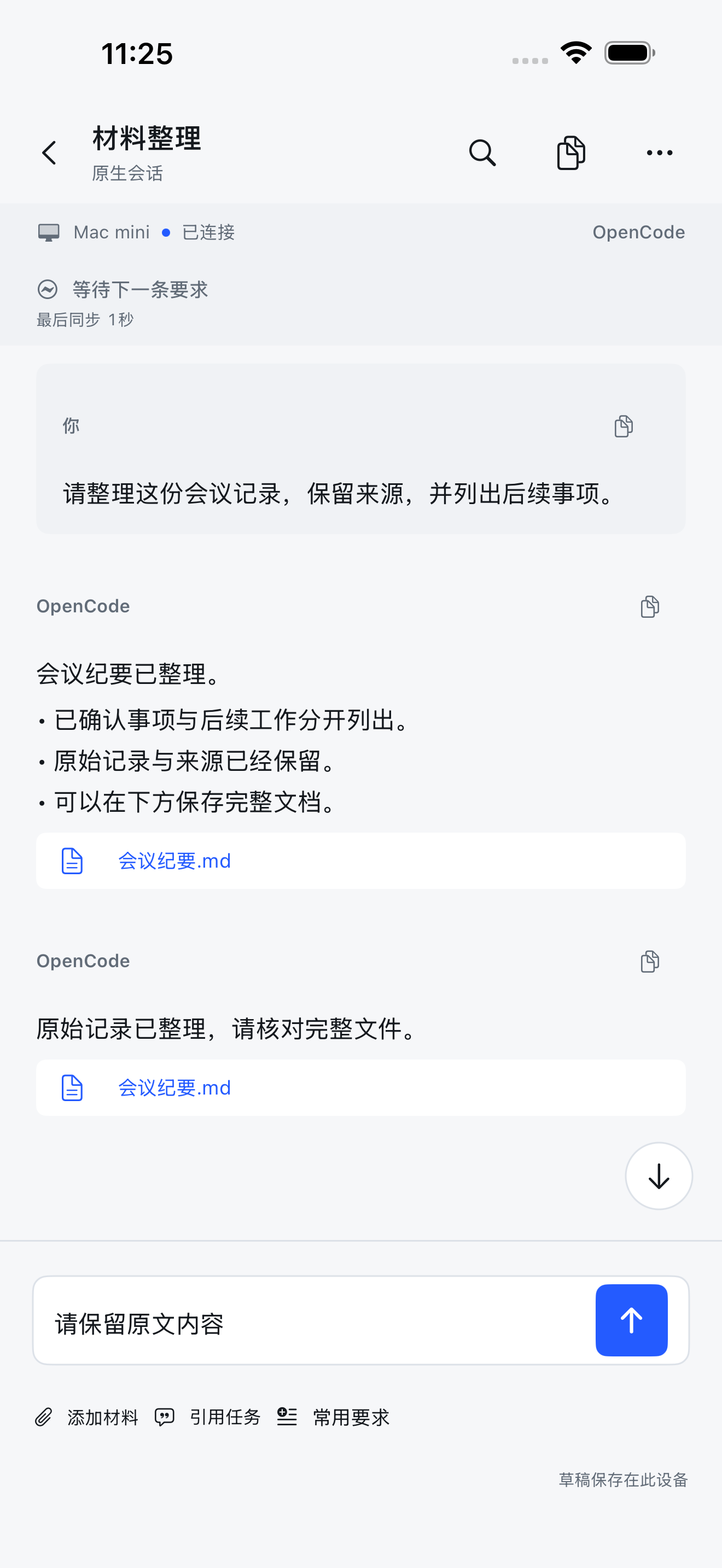
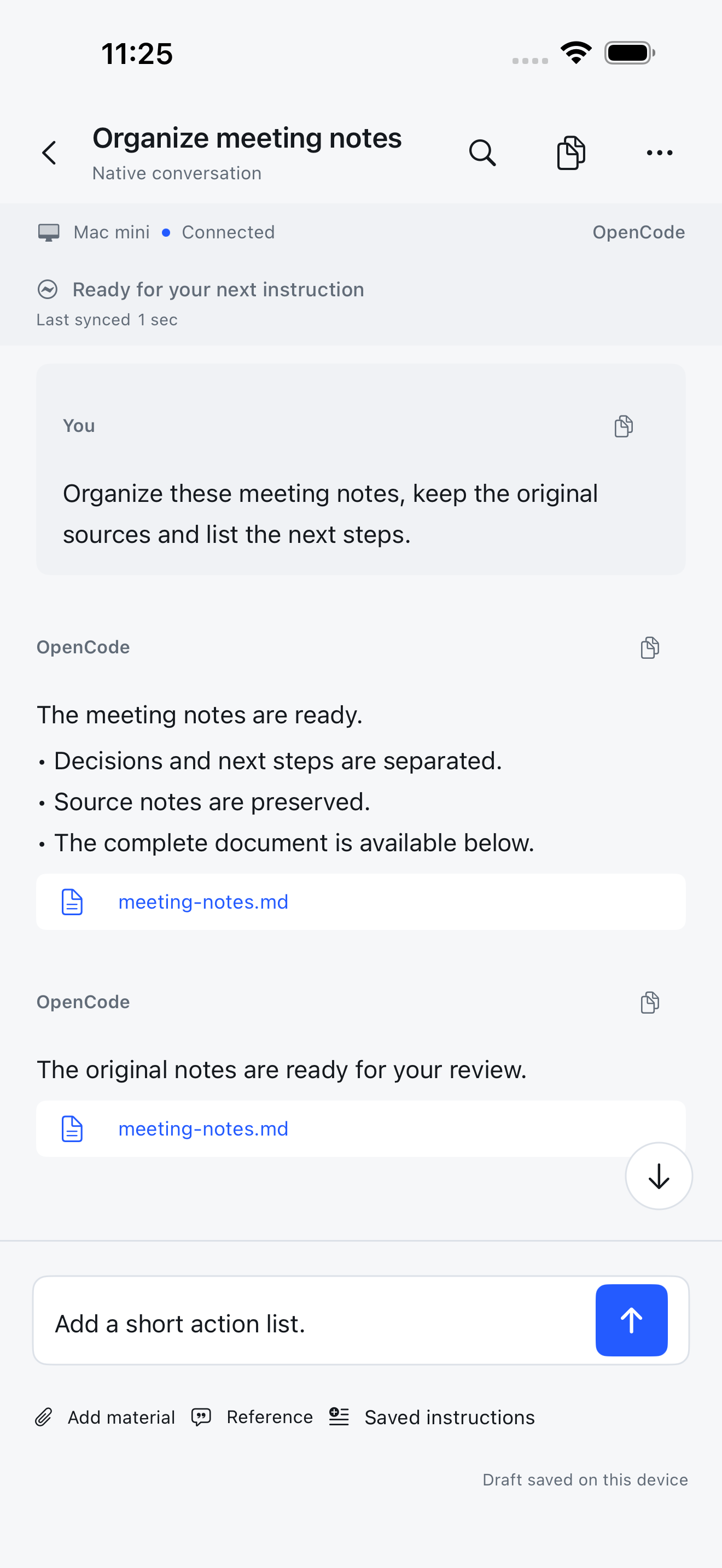
iPhone 上的 Shellcove · 界面示例Shellcove on iPhone · sample conversation
每一次投入,都值得接着往前。Keep building on what you started.
你积累的上下文、选好的模型、顺手的工具,都是工作的一部分。Shellcove 让你在手机上接回这些积累,一段研究、一篇创作、一个项目,都可以沿着原来的思路继续。The context you have built, the model you have chosen, the tools that feel right: they are all part of your work. Shellcove brings that continuity to your phone, so your research, writing and projects can keep their direction.
回到熟悉的思路里。Pick up the thread.
原生会话保留已有的上下文,模型与工具沿用你的选择。在手机上继续提问、补充判断,让之前投入的心思接着发挥作用。Continue supported native conversations with their existing context, model and tools. Ask the next question or add your perspective, building on the thought you have already put in.
需要你时,一眼找到重点。Know where your attention matters.
待答的问题、待核对的提交和新回复,各有清楚的位置。展开真实执行记录,回到原文,也看清接下来能做什么。Questions, uncertain submissions and new replies each have a clear place. Read actual execution records, return to the source and see what you can do next.
成果,完整交到你手里。Keep the work you have made.
报告、草稿与文件,回到手边继续使用。保留来源与版本,保存完整原件,或交给你熟悉的 App 接着处理。Bring reports, drafts and files back to your device. Keep their sources and versions, save complete originals or continue in the apps you prefer.
把有效的方法,留给下一次。Let a good approach become your own.
把常用要求整理成自己的文字模板,编辑后填入草稿。需要回看依据时,搜索已加载的会话、工具记录和文件名,再回到原文。Save the instructions that work for you and edit them into a new draft. When you need to revisit a source, search loaded conversations, tool records and filenames, then return to the original.
连接你已经信赖的 Agent。Stay with the Agent you know.
Codex、Grok Build、OpenCode、ZCode、DeepSeek Harness。你熟悉的原生 Agent,继续在自己的 Mac 上工作;Shellcove 将会话、进展与成果接到手机上。Codex, Grok Build, OpenCode, ZCode and DeepSeek Harness. Your familiar native Agent keeps working on your own Mac. Shellcove brings its conversations, progress and files to your phone.
账号、模型与工具授权继续由原生客户端管理,无需注册 Shellcove 云账号。具体支持范围见 Agent 接入说明。Native clients continue to manage accounts, models and tool authorization, without a Shellcove cloud account. See Agent requirements for the supported scope.
为你认真投入的事,多留一些从容。A little more freedom in how you work.
让好奇,成为有依据的研究。Follow a question further.
从一个值得追问的问题开始,整理材料、补充判断,逐步形成有来源、有脉络的文档。下一次打开,继续沿着自己的思路往前。Start with a question worth pursuing. Organize material, add your judgment and develop a document with sources and a clear direction. Pick up your line of thought when you return.
让想法,逐渐有了形状。Give an idea its shape.
随手记下的想法,可以接成大纲、初稿与修改。不同时间投入的心思,留在同一段会话里,逐步成为可以交付的作品。A thought becomes an outline, a draft and a revision. Keep those moments of effort in one conversation as the work takes shape.
让项目,稳稳接上下一步。Keep a project moving.
继续原有开发会话,查看修改、执行记录和待处理的问题。需要时补充要求,方便时回看结果,跟上项目的每一段进展。Continue a development conversation, review changes and execution records, and find open questions. Add an instruction when needed and return to the results when it suits you.
研究、创作与开发,共用一套自然的交互。具体处理能力取决于你使用的 Agent、模型与工具。One familiar way to work across research, writing and development. Available abilities depend on your Agent, model and tools.
开始很轻,衔接自然。Easy to begin. Natural to continue.
接上自己的 MacConnect your Mac
确认原生 Agent 可用,用 iPhone 或 iPad 扫描 Mac 上的配对码。Check that your native Agent is available, then scan the Mac’s pairing QR with iPhone or iPad.
继续正在做的事Continue what matters
选择已有会话,或从一个新目标开始。材料与交付要求,也可以一起带过去。Choose an existing conversation or start with a new goal. Bring the materials and the result you need.
把进展与成果带在身边Bring the result with you
查看回复,处理需要你参与的事,再把完整文件保存到自己的设备。Read replies, take care of what needs you and save complete files to your device.
执行 Mac 需要保持在线、唤醒。手机离线不打断已经接收的工作;重新连接后,再接上进展。Keep the execution Mac online and awake. A phone disconnect does not interrupt accepted work; reconnect to catch up.
开始前,你可能想知道Before you start
Cloud Agent 的工作在哪里运行?Where does Cloud Agent run the work?
在你自己的 Mac 上。Shellcove 是 iPhone、iPad 与 Mac 之间的 Agent 任务入口,提供访问、状态、可靠送达和文件取回。你需要已有可用的原生 Agent。On your own Mac. Shellcove is an Agent task terminal across iPhone, iPad and Mac, providing access, status, reliable delivery and file retrieval. You need a configured native Agent.
关掉手机 App,任务会停止吗?Does leaving the phone app stop a task?
不会因为手机断线而停止已接收的工作。Mac 及原生 Agent 需要保持运行,Mac 也需要在线、唤醒。回来重新连接后,可以继续阅读进展和结果。A phone disconnect does not stop accepted work. Keep the Mac and native Agent running, and the Mac online and awake. Reconnect to read progress and results.
原有会话和模型需要重新配置吗?Do I need to set up my conversations or model again?
沿用原生客户端的登录、模型和会话。能否继续某个已有会话,以 Agent 提供的能力和当前归属为准;查看支持范围。Native clients retain their login, model settings and conversations. Whether an existing conversation can continue depends on the Agent’s capabilities and ownership. See the supported scope.
文件可以保存到手机吗?Can I save files to my phone?
可以从真实文件引用取回不超过 10 MiB 的完整原件,保存副本或用其他 App 打开。图片和视频支持预览;文档处理由你选用的 App 完成。Retrieve complete originals up to 10 MiB from real file references, then save a copy or open them in another app. Images and videos can be previewed; use your chosen app for documents.
多台 Mac 会自动接力完成任务吗?Do several Macs automatically share a task?
你可以连接多台 Mac,分别安排不同工作。每个任务固定在一台 Mac,相关原生会话也留在那里;不会自动拆分或迁移到另一台电脑。Connect several Macs and give them separate work. Each task and its native conversations stay on one Mac; Shellcove does not automatically split or migrate a task.
我的任务和文件会发到哪里?Where do my tasks and files go?
内容在已配对设备之间传输;你提交给原生 Agent 的内容会按其配置交由模型服务商处理。Shellcove 没有广告或使用统计。必要时的中继转发加密内容,可能处理连接元数据。阅读隐私说明。Content moves between paired devices. Native Agents may send submitted content to their configured model providers. Shellcove has no ads or usage analytics. Relays forward encrypted content and may process connection metadata. Read the privacy policy.
下一步,在你手边。Your next step is close at hand.
准备好 Mac 与原生 Agent,连接你的 iPhone 或 iPad。从一段熟悉的会话开始,让 Shellcove 接上你的工作方式。Connect your iPhone or iPad to your Mac and native Agent. Start with a familiar conversation, and make Shellcove part of the way you work.